




What makes a high converting landing page for lead generation
A landing page built for lead generation has one job: get a qualified visitor to submit their details. So the main menu and the blog links come off, and there is never a second offer. Every element on the page should either build trust or move the visitor toward the form.
Most roundups show pretty SaaS pages and stop there. The design matters less than five decisions made before anyone opens a page builder: the offer, the headline, the form, the proof and what happens after submission. Get those right and a plain page will beat a beautiful one.
Our test before any paid traffic: hand someone a phone and give them five seconds. If they cannot say what you offer, who it is for and what happens after they submit, the page is not ready.
| Element | What it must do | Common mistake |
|---|---|---|
| Headline | Repeat the promise from the ad or search query | Clever slogan that hides the offer |
| Offer | Give one concrete reason to submit now (quote, consultation, guide) | "Contact us" with nothing in return |
| Form | Collect only what sales needs to qualify and call back | Eight fields, half of them free text |
| Proof | Reviews, photos of real work, numbers, recognizable logos | Generic stock photos and vague claims |
| CTA | State the outcome: "Get my free quote" | "Submit" or "Learn more" |
| Next step | Tell people what happens and when | Silence after the form, no confirmation |
9 landing page examples for lead generation by business type
Screenshots of big brands are fun to look at and hard to copy. These 9 patterns are grouped by the kind of business that uses them instead, each with the offer, the fields and the detail that usually decides whether it converts.
1. Free quote page (home services: roofing, HVAC, cleaning, solar). The headline names the service and the area, for example "Roof repairs in Manchester, free quote within 24 hours". Ask for service type as a single choice, ZIP or postcode, name and phone. On mobile the form goes above the fold. These visitors already know what they want, and they will not scroll far to find it.
2. Consultation booking page (clinics, dentists, law firms, financial advisors). The offer is a free or low-cost first consultation. Ask which treatment or service they want, then let them pick a time in a booking calendar. For expensive or sensitive services we would use a callback form instead. People want to ask about price before they commit to a slot.
3. Event and venue inquiry page (hotels, conference venues, wedding venues). Ask for event type, guest count as ranges (under 50, 50 to 150, 150 plus) and the preferred month. With those answers a sales manager can price the inquiry before the first call. Show the rooms and capacity numbers next to a sample package. Planners compare several venues at once, and a venue that hides its capacity just makes them do extra work.
4. Course or training enrollment page (driving schools, drone training, certifications, bootcamps). Lead with the outcome, the license or certificate, then show dates, location, duration and a starting price. Add a short FAQ about entry requirements, since unanswered questions about requirements are what stop people from submitting. The CTA is "Reserve my spot" or "Get the course schedule".
5. Test drive or vehicle inquiry page (car dealerships). Build one page per model or stock group. A generic showroom page wastes the click: someone who searched for a specific model should land on that model, with price, availability and finance options. Google calls this landing page experience, meaning how relevant and useful the page is to the person who clicked your ad.
6. Demo request page (B2B software and services). Ask for work email, company size as a range and role. Add a short list of what the demo covers and how long it takes. Qualifying fields do cut volume. For B2B we accept that, because your sales team pays for every unqualified call with their time.
7. Lead magnet page (checklist, price guide, template). The classic ebook download page. Leads are cheaper and intent is lower, so it only pays off with a nurture sequence behind it. Without one, we would not bother. Name the exact deliverable ("2026 kitchen renovation price guide, 12 pages") instead of "Free ebook".
8. Quiz or calculator page (insurance, solar savings, fitness, finance). The visitor answers 3 to 5 questions and gets a personalized result in exchange for contact details. Every answer tells sales something, so the quiz doubles as qualification. Lead qualification surveys let you build one without code.
9. Webinar or open day registration page (education, real estate, B2B). Show the date, time zone and speaker, plus what people will learn. The form can be very short. The reminders matter more than the page itself: skip the SMS and email reminders and a large share of registrants never show up.
| Page type | Best for | Buying intent | Typical fields |
|---|---|---|---|
| Free quote | Home and local services | High | Service, ZIP/postcode, name, phone |
| Consultation booking | Clinics, legal, finance | High | Service, name, phone, time slot |
| Event inquiry | Hotels and venues | High | Event type, guest range, month, contact |
| Course enrollment | Training and education | Medium to high | Course, start date, name, phone |
| Test drive / model inquiry | Car dealers | High | Model, name, phone, preferred day |
| Demo request | B2B | Medium to high | Work email, company size, role |
| Lead magnet | Any, top of funnel | Low | Name, email |
| Quiz / calculator | Insurance, solar, finance | Medium | 3 to 5 quiz answers, then contact |
| Webinar / open day | Education, real estate, B2B | Medium | Name, email, phone for reminders |
Best landing page examples 2026: what the data says
The most useful dataset we found is the Unbounce Conversion Benchmark Report (2024 edition): more than 41,000 landing pages and 57 million conversions. The median conversion rate across all industries was 6.6%. Industry medians ranged from 3.8% to 12.3%, so check your own industry before you judge your page against one global figure.
Mobile brought 83% of visits, yet desktop converted 8% better on average. Our read is that much of that gap comes from forms and layouts designed on a laptop and never tested with a thumb.
Two more findings should change how you write the page:
- Simple copy wins. Pages written at a 5th to 7th grade reading level converted at 11.1%, compared with 5.3% for professional-level writing. Financial services was the exception.
- Shorter tends to convert better. Word count, reading time and the share of long words all correlated negatively with conversion rate. Cut the paragraph you are proudest of first.
| Metric (Unbounce, 2024) | Value |
|---|---|
| Median conversion rate, all industries | 6.6% |
| Range of industry medians | 3.8% to 12.3% |
| Conversion at 5th to 7th grade reading level | 11.1% |
| Conversion at professional reading level | 5.3% |
| Share of visits from mobile | 83% |
Lead generation landing page forms: volume vs quality
The form is where most lead generation landing pages win or lose. Each extra field costs you submissions. Each missing one sends more junk leads to your sales team. There is no perfect form, only a point on that trade-off that fits how your team sells.
Our default is a short form of single-choice questions with 3 to 4 answers each, instead of free-text fields. Tapping "50 to 150 guests" takes a second. Typing a number feels like work. The answers also arrive clean, so your CRM can sort and route leads automatically.
Next comes SMS number verification. We add it to contact forms when fake or mistyped phone numbers start to pile up. It does cost some submissions. For a business that lives on phone calls that is usually a good trade, because a lead you cannot reach is not a lead.
How we would set it up by intent:
- High intent offers (quote, consultation, test drive): 3 to 5 fields, phone required, verification on.
- B2B demos: work email plus 2 qualifying single-choice questions.
- Lead magnets and webinars: name and email only, then qualify by email later.
- Never ask for information you will not use on the first call.
Landing page or Meta lead form: when a page is not worth building
Sometimes you should skip the page. Meta's instant lead forms open inside Facebook and Instagram, prefill the user's details and never load a page at all. For many local service businesses on smaller budgets, they bring cheaper leads than any landing page.
Our own numbers show how far lead forms can go. For a hotel and corporate events client in Poland, Meta campaigns from April to August 2026 brought 345 lead-form leads at an average of $4.59 per lead (converted from PLN). Monthly volume grew from 11 to 153 leads, and cost per lead fell from $9.92 to $3.31, about two thirds lower. Polish ad auctions are cheaper than US and UK ones. Take the trend from this, not the price.
If your offer is simple and Meta is your only channel, we would start with lead forms and build a page later. We switch to a landing page when:
- You run Google Ads. Search traffic needs a page, and Google judges how relevant that page is.
- The offer needs explaining: price, process, before and after photos, FAQs.
- Lead-form leads are cheap but unreachable or unqualified, and you need more friction to filter them.
- You want one page that every channel can point to: Meta, Google, email and organic.
What happens after the form: the part most examples skip
None of the top-ranking roundups we reviewed cover what happens after someone submits, and that is where a lot of paid leads disappear. Someone who filled in a form at 9 pm and heard nothing until the next afternoon has often contacted a competitor by then.
Our setup sends every lead an SMS and an email within 1 second of signing up. The SMS confirms the request and says when to expect a call, while the email repeats the offer with a link to book a time. A short sequence follows, usually 3 emails with proof and answers to common objections.
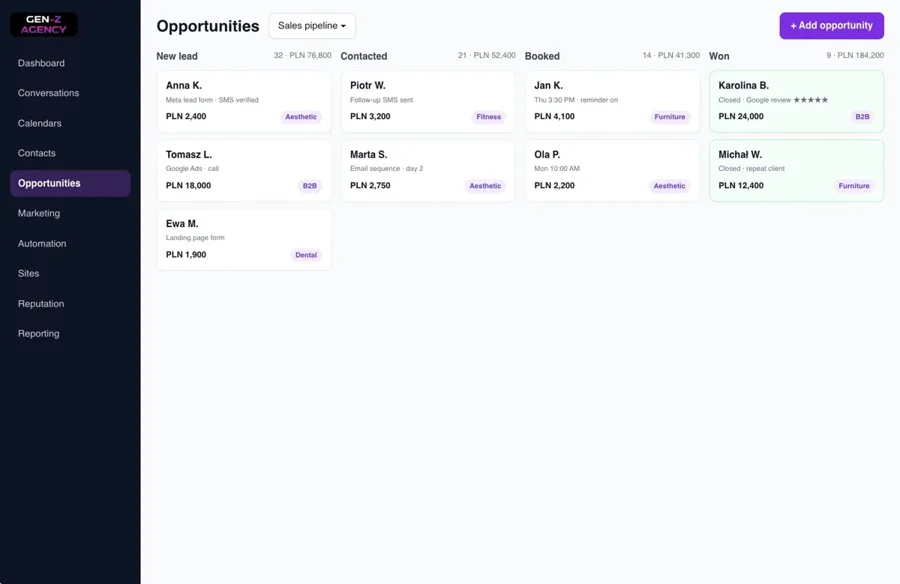
It all runs from the Gen Z CRM, which we include at $0 for agency clients. The lead lands in a pipeline and the sales team gets notified, while marketing automation handles the reminders. On a different CRM the rule stays the same: confirm instantly, give every lead an owner, and never let follow-up depend on someone remembering.
Measure the whole path, not only the page. Track form submissions as a conversion in Meta and Google and tag every link with UTM parameters. Then compare cost per lead with cost per qualified lead. If a page doubles submissions but halves the share of reachable leads, you have gained nothing.
Mistakes that kill lead generation landing pages
Check these before you blame the ads or the budget. Most are cheap to fix, and fixing them often does more than a full redesign.
- Sending paid traffic to the home page. Visitors have to hunt for the offer they clicked on, and many give up.
- A headline that does not match the ad. If the ad says "free quote in 24 hours", the page must say it too, in the same words.
- A navigation menu and five links out. Each link is an exit. Remove them on campaign pages.
- A weak CTA. "Submit" tells people nothing. A good call to action names the result: "Get my free quote".
- Desktop-first design. Before launch, fill in the form on a phone using one thumb.
- No proof near the form. Doubt peaks right at the button, so put reviews or real photos next to it.
- One page for every audience. A dealership selling five models needs five pages.
- No speed to lead. A great page with a slow callback loses to an average page with an instant reply.
How we build lead generation landing pages at Gen Z Agency
We build landing pages for lead generation as part of the campaign, never as a separate web project. Page, ads, form and follow-up get planned together, since a change in one affects the others. Our portfolio covers 9 websites and landing pages, 20 email campaigns and 4 email sequences across different industries, all on our results page.
Here is the order we work in:
- Offer and audience. We agree on one offer per page and the questions sales needs answered before a call.
- Page and form. Short copy, proof near the form, single-choice questions, SMS verification where reachability matters.
- Tracking. Conversions go back to Meta and Google so campaigns optimize for real leads.
- Launch. Campaigns go live within 3 days, with new ad creatives every week.
- Follow-up. SMS and email within 1 second, then a 3-email sequence and a CRM pipeline for your team.
| Our 2026 campaign results (Poland) | Number |
|---|---|
| Leads generated for clients since January 2026 | 2,439 |
| Companies with campaigns in 2026 | 18 |
| Average cost per lead, all clients | $6.97 (converted from PLN) |
| Aesthetic clinic, blended CPL June vs August 2026 | $9.41 to $5.75 |
| Drone training school, first month | 172 leads at $3.11 per lead |
Should you build it yourself or hire someone
With one service, one location and a small budget, start yourself. Pick the page type that matches your business, keep the form to 3 to 5 fields and run traffic for two to four weeks before you change anything. Edits every few days leave you with too little data to learn from. A funnel builder is enough for this, no code needed.
Get help when you spend real money on ads every month and the numbers stall, or when you need separate pages for several services or audiences. To see what your current pages cost you, run your numbers through our CPL calculator.
For lead generation clients we charge a fixed price per qualified lead with a monthly cap and no management retainer. The whole ad budget goes to Meta and Google, with no commission on spend. Our guide to pay per lead marketing explains how that model works. If you want us to look at your landing page and campaigns, book a free 30-min strategy call.
Frequently asked questions
01What is a lead generation landing page?
A lead generation landing page is a standalone page built to collect contact details in exchange for an offer, such as a free quote, consultation, demo or guide. It has one goal and one call to action. There is no navigation menu pulling visitors away.
02What is a good conversion rate for a lead generation landing page?
Unbounce's 2024 benchmark report found a median conversion rate of 6.6% across more than 41,000 landing pages, with industry medians from 3.8% to 12.3%. High-intent offers like free quotes usually convert better than lead magnets. Compare yourself to your own industry and traffic source, not one global number.
03How many form fields should a lead generation landing page have?
For high-intent offers, start with 3 to 5 fields: the service, a location or size question, name and phone. Use single-choice answers instead of free text wherever you can. If sales will not use a piece of information on the first call, do not ask for it.
04Is a landing page better than a Facebook lead form?
Meta lead forms often bring cheaper leads because they prefill user details and skip the page load. A landing page wins for Google Ads traffic, for offers that need explaining, and when lead-form leads turn out to be unreachable. Many businesses run both and compare cost per qualified lead.
05How long should a lead generation landing page be?
As short as the offer allows. Unbounce's 2024 data shows that higher word count and longer reading time correlate with lower conversion rates. Expensive or complex offers need more proof and FAQs, but keep the form visible early on mobile.
06What should I test first on my landing page?
Start with the headline and the offer, since they decide whether people keep reading. Then test the number and type of form fields. Button colors and small design details rarely matter as much as a clearer promise.
Was this guide helpful?One click helps us write better ones.
Thanks! The next guide is waiting below.
Thanks for being honest. Ask us directly: book a free 30-min call.